
Ford Keyless Entry Keypad Programming Instructions: A Comprehensive Guide
Navigating Ford’s keyless entry system requires understanding the BCM’s role and potential reset methods. Accessing the factory code, or utilizing FORScan, are crucial steps.
Understanding the Ford Keyless Entry System
Ford’s keyless entry system offers convenient access to your vehicle without a traditional key, relying on a numeric keypad typically located on the driver’s side door. This system isn’t self-contained; the keypad functions as an input device, transmitting signals to the Body Control Module (BCM); The BCM is the central hub where the security code is actually stored and processed.
It’s important to realize the keypad itself doesn’t retain the code. Instead, it sends the entered digits to the BCM for verification. If the entered code matches the stored code, the BCM unlocks the doors. This separation of input and storage enhances security. Furthermore, newer models may implement a lockout feature after a certain number of incorrect attempts – around 35 keystrokes – to prevent unauthorized access. Understanding this architecture is fundamental when troubleshooting or reprogramming the system.
Where the Code is Stored: The BCM
The Body Control Module (BCM) is the brain behind Ford’s keyless entry system, serving as the secure repository for your door code. Unlike the keypad, which merely facilitates input, the BCM permanently stores the factory-set code. This code remains constant unless intentionally altered through programming or if the BCM itself is replaced. It’s a crucial distinction to understand when attempting to reset or retrieve the code.
Accessing and manipulating the code directly requires interfacing with the BCM. This is typically achieved using specialized diagnostic tools like FORScan, coupled with a Ford-approved OBD scanner. The BCM’s location varies depending on the vehicle model, but it’s commonly found under the dashboard, near the driver’s side, or behind the glove compartment. Recognizing the BCM as the central point of control is essential for any keyless entry troubleshooting or reprogramming efforts.
Locating the Factory Code
Finding your original factory code is the simplest path to regaining access if you’ve lost it. Ford typically provides this code on a small card included with the owner’s manual when the vehicle was new. This card is often kept within the owner’s manual itself, or sometimes separately in the glove compartment. The code is a five-digit number crucial for programming the keypad.
However, if the original card is missing, alternative methods exist. If you have two originally programmed key fobs, turning the ignition to the “on” position (without starting the engine) may display the factory code on the instrument cluster. This method isn’t universally applicable across all Ford models, but it’s worth attempting. If these initial searches prove fruitless, more advanced techniques, like utilizing FORScan or contacting a Ford dealership, may be necessary.

The Factory Code Card
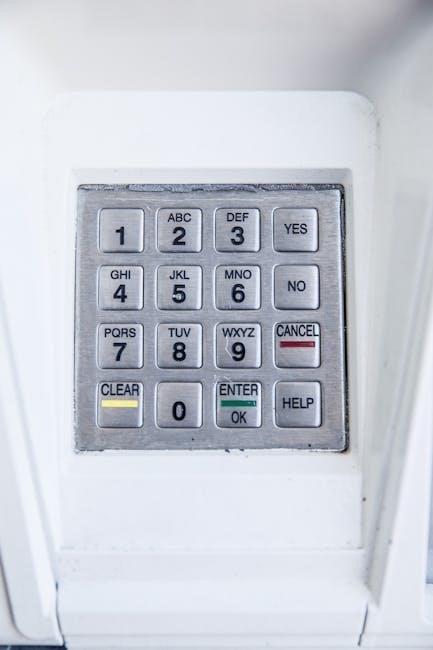
The factory code card is your primary resource for resetting or reprogramming your Ford vehicle’s keyless entry keypad. This small card, provided with the original vehicle documentation, contains a unique five-digit code assigned to your specific vehicle at the factory. It’s essential to safeguard this card alongside your owner’s manual, as it’s the quickest and easiest way to restore keypad functionality if lost or compromised.
Ford typically includes this card within the owner’s manual packet, but it may also be found separately in the glove compartment. The code itself is permanent unless the Body Control Module (BCM) is replaced. Losing this card doesn’t necessarily mean permanent lockout; however, it necessitates exploring alternative, potentially more complex, recovery methods. Always check thoroughly through all vehicle paperwork before assuming it’s lost.
Retrieving the Code with Two Programmed Keys

A convenient method for uncovering your Ford’s keyless entry code exists if you possess two originally programmed key fobs. This bypasses the need for the factory code card or more involved reset procedures. Simply insert one of the programmed keys into the ignition and turn the vehicle to the “on” position – do not start the engine.
With the key in the “on” position, the five-digit keyless entry code will often display directly on the instrument cluster. This feature is designed as a built-in recovery tool for situations where the code card is unavailable. Ensure both keys are functioning correctly and properly recognized by the vehicle’s system. This method provides a straightforward solution, eliminating the need for external tools or software, offering a quick and easy code retrieval process.
What to Do If You’ve Lost the Factory Code
Losing the factory code card doesn’t necessarily mean permanent lockout from your Ford’s keyless entry system. Several alternative methods exist to regain access. If you have two original, programmed keys, the code can often be retrieved directly from the instrument cluster by turning the ignition to the “on” position without starting the engine.
However, if this isn’t viable, accessing the vehicle’s Body Control Module (BCM) becomes necessary. This typically requires a computer with FORScan software and a Ford-approved OBD scanner. FORScan allows you to read and potentially reset the code. Alternatively, a manual reset procedure, involving a specific sequence of keypad presses, can be attempted, though it’s more time-consuming. Professional assistance from a Ford dealership or qualified locksmith is also an option if these methods prove unsuccessful.
Resetting the Code Using FORScan
FORScan provides a powerful method for resetting a lost or forgotten Ford keyless entry code. This process involves directly interfacing with the vehicle’s Body Control Module (BCM) via an OBD scanner and compatible software on a computer. Accessing the BCM requires a Ford-approved OBD scanner with USB connectivity, enabling communication between the vehicle and your computer running the FORScan application.

The software allows you to read the existing code (if accessible) and, more importantly, to program a new one. It’s crucial to follow the FORScan instructions carefully, as incorrect procedures could potentially cause issues with other vehicle systems; Before starting, ensure you have a stable connection and understand the specific parameters within the FORScan interface related to keyless entry programming. This method offers a reliable solution when other retrieval methods fail.
Required Tools for FORScan Reset
Successfully resetting your Ford keyless entry code with FORScan demands specific tools. First, a computer is essential, capable of running the FORScan software – ensuring it meets the program’s system requirements is vital for smooth operation. Secondly, a Ford-approved OBD scanner with a USB connector is non-negotiable; this device bridges the communication gap between your vehicle’s BCM and your computer.
Generic OBD scanners often lack the necessary compatibility for FORScan’s advanced functions. Access to the vehicle’s BCM is also implicitly required, typically located under the dashboard or behind the glove compartment. Having these tools prepared beforehand streamlines the process, minimizing potential delays and frustrations. Confirming compatibility and functionality of each component before initiating the reset is highly recommended for a successful outcome.
Computer with FORScan Software
The cornerstone of a FORScan-based keyless entry reset is a compatible computer. This machine must reliably run the FORScan software, demanding sufficient processing power and RAM for optimal performance. Operating systems like Windows are generally supported, but verifying compatibility with the latest FORScan version is crucial before proceeding.
Ensure the computer has a stable internet connection for initial software download and potential updates. A dedicated computer, rather than a shared family device, is advisable to avoid conflicts or interruptions during the reset process. Furthermore, consider a laptop for portability, allowing convenient access to the vehicle’s BCM. Backing up important data before installing FORScan is a prudent safety measure, safeguarding against unforeseen issues.
Ford-Approved OBD Scanner with USB
A Ford-approved OBD (On-Board Diagnostics) scanner with a USB connection is essential for communicating with the vehicle’s BCM. Standard OBDII scanners are insufficient; the scanner must be compatible with Ford’s proprietary diagnostic protocols. This ensures accurate data transfer and successful execution of FORScan commands.
The USB connection facilitates a reliable link between the scanner and your computer, enabling FORScan to access and modify the BCM settings. Investing in a quality scanner is paramount, as cheaper alternatives may lack the necessary functionality or exhibit connectivity issues. Verify the scanner’s compatibility with your specific Ford model year before purchase. Proper installation of the scanner’s drivers on your computer is also critical for seamless operation.
Accessing the Vehicle’s BCM
Successfully resetting or reprogramming your Ford’s keyless entry code hinges on gaining access to the Body Control Module (BCM). The BCM is the central hub storing the keypad code and requires direct communication via the OBDII port. Typically, the BCM is located under the dashboard, often near the driver’s side, or concealed behind the glove compartment. However, specific locations vary depending on the vehicle’s year and model.
Once located, connect the Ford-approved OBD scanner with its USB cable to your computer running the FORScan software. Ensure a secure connection. FORScan will then initiate a diagnostic session, allowing you to navigate the BCM’s parameters. Careful navigation is crucial; incorrect modifications can lead to system malfunctions.
BCM Location: Common Areas
Pinpointing the Body Control Module (BCM) is the first physical step in resetting your Ford’s keyless entry code. While variations exist across models and years, several locations are frequently encountered. The most common area is underneath the dashboard, specifically on the driver’s side. Look for a module secured with screws or clips, often near the steering column or kick panel.
Another frequent location is behind the glove compartment. You may need to partially or fully remove the glove box to gain access. Less commonly, the BCM can be found under the rear side panels, inside the center console, or even integrated into the fuse box. Consulting your vehicle’s repair manual is highly recommended for precise location details.
Manual Reset Procedure (Without FORScan)
A manual reset offers a solution when FORScan isn’t available, but it requires patience and adherence to a specific procedure. Ford vehicles often implement a security feature that disables the keypad after approximately 35 consecutive incorrect key presses. This is a safeguard against brute-force attempts to guess the code.

To initiate the reset, repeatedly enter incorrect codes until the keypad locks. Then, using the key in the driver’s side door, unlock and lock the vehicle multiple times. This action can sometimes trigger the system to revert to a default state, allowing you to reprogram a new code. Alternatively, waiting for a full minute after the lockout may also reset the system. Remember to carefully navigate the keypad string during reprogramming, as the correct sequence is crucial.
The 35-Keypad-Stroke Rule
Ford’s keyless entry systems incorporate a security measure known as the “35-keypad-stroke rule” to prevent unauthorized access. After 35 consecutive incorrect code attempts, the keypad temporarily disables itself as a protective mechanism against guessing the correct combination. This lockout period is designed to deter potential thieves or unwanted entry.
However, resourceful owners can utilize this rule to their advantage during a manual reset. By intentionally exceeding the 35-stroke limit, the system can be forced into a reset mode. Understanding this rule is vital when attempting to reprogram the keypad without diagnostic tools like FORScan. Someone discovered a way to break the string into groups, making it easier to navigate and pinpoint the correct digits after reaching the 35-stroke threshold.
Navigating the Keypad String
Successfully resetting a Ford keyless entry system via the 35-keypad-stroke method hinges on understanding the underlying keypad string. This string, a pre-programmed sequence of numbers, dictates the correct code after the system resets. It’s not a random sequence; it’s a consistent pattern embedded within the BCM’s programming.
To simplify the process, experienced users have broken down this lengthy string into manageable groups of digits. This segmentation allows for easier identification of the correct code once the 35-stroke limit is reached. Remember that the last five digits entered typically unlock the door, so after the 35th stroke, backtracking four or five numbers is often necessary to find the working combination. Patience and methodical entry are key to success when navigating this keypad string.
Using the Reset Method with the Key
When the keypad is locked out due to excessive incorrect attempts or the 35-keypad-stroke rule, utilizing a programmed key offers a viable reset pathway. This method bypasses the need for the factory code or FORScan in certain scenarios, providing a convenient solution for regaining access. Insert a valid, programmed key into the driver’s side door and cycle the ignition from ‘off’ to ‘on’ – do not start the engine.
This action often prompts the vehicle’s system to display the factory keyless entry code on the instrument cluster. This displayed code can then be used to unlock the keypad and regain functionality. If two programmed keys are available, this process is generally more reliable; This key-based reset is a valuable troubleshooting step before resorting to more complex procedures.
Programming a New Code (After Reset)
Following a successful reset, establishing a new, personalized keyless entry code is paramount for security. After the keypad is unlocked, initiate the programming sequence – typically involving pressing the ‘1’ and ‘3’ buttons simultaneously, though specific procedures may vary by model year. The system will usually confirm entry into programming mode with an audible chime or visual cue.
Carefully enter your desired five-digit code, remembering it must be unique and easily memorized. Confirm the code by re-entering it, ensuring accuracy to avoid lockouts. The vehicle’s system will provide confirmation upon successful programming, often through another chime or a message on the instrument cluster. Document your new code securely, separate from the vehicle, to prevent future access issues.
Entering the New Code Sequence
Once programming mode is activated, the keypad awaits your chosen five-digit code. Begin by carefully pressing each digit, observing for visual or auditory feedback confirming each entry. Remember, the system may have a slight delay between keystrokes, so avoid rapid input. Accuracy is crucial; an incorrect digit will necessitate restarting the process.
After entering the first sequence, the system will prompt for confirmation. Re-enter the exact same five-digit code. This step verifies your input and prevents accidental programming errors. Pay close attention to the keypad’s response – a successful entry is usually indicated by a chime or a message on the vehicle’s display. If errors occur, consult your owner’s manual or a qualified technician.
Confirmation of New Code
Successful code entry is typically acknowledged with an audible chime and a visual confirmation on the instrument cluster. The system may display a message like “Code Accepted” or “Keypad Programmed,” indicating the new code has been successfully stored in the Body Control Module (BCM). It’s vital to verify this confirmation before assuming the process is complete.
Immediately test the new code by attempting to unlock the driver’s side door using the keypad. If the door unlocks, the programming was successful. If it fails, repeat the entire programming sequence, ensuring accuracy during each step. Remember the 35-keypad-stroke rule; excessive attempts may temporarily disable the keypad. Document your new code in a secure location, separate from the vehicle, for future reference.
Troubleshooting Common Issues
Several issues can arise during or after keypad programming. A keypad not responding often indicates a low battery in the remote key fob or a potential issue with the keypad itself, requiring inspection or replacement. If the code isn’t working after a reset, double-check the entered sequence for errors and ensure the BCM has fully accepted the new code – sometimes a second attempt is needed.
BCM communication errors, particularly when using FORScan, can stem from a faulty OBD scanner, a loose connection, or a deeper electrical issue within the vehicle. Ensure the scanner is Ford-approved and properly connected. If problems persist, consider seeking professional assistance. Remember the 35-keypad-stroke rule; exceeding this limit can temporarily lock the system.
Keypad Not Responding
A non-responsive keypad can be frustrating, but several factors could be at play. First, check the remote key fob batteries; a weak signal can sometimes interfere with the keypad’s functionality. Ensure there isn’t physical damage to the keypad itself – look for stuck buttons or visible wear. The system may temporarily disable the keypad after numerous incorrect attempts, implementing a security lockout.
Remember the 35-keypad-stroke rule; exceeding this limit triggers a temporary disablement, requiring a waiting period (approximately one minute) or a reset procedure using a programmed key. If the issue persists, it could indicate a deeper problem with the Body Control Module (BCM) or its wiring. Inspect the BCM location for any signs of corrosion or damage.
Code Not Working After Reset
If the keypad code fails to function after a reset, double-check the entered sequence. Ensure accuracy, as even a single incorrect digit will prevent access. Remember that the reset process, particularly the 35-keypad-stroke method, requires careful navigation of the generated string. It’s easy to miscount or input the wrong numbers, especially when attempting the faster method of backtracking from the 35th digit.
Verify that the BCM has correctly accepted the new code. Sometimes, communication errors can occur during the programming process. If using FORScan, confirm there were no error messages during the code input and confirmation stages. If the problem continues, consider repeating the reset procedure from the beginning, paying close attention to each step. A faulty BCM could also be the root cause, necessitating professional diagnosis.
BCM Communication Errors
Encountering BCM communication errors during programming often stems from connection issues. Ensure the Ford-approved OBD scanner is securely connected to the vehicle’s diagnostic port and the computer. Verify the FORScan software is correctly installed and configured to communicate with your vehicle’s specific model year and BCM. A loose connection or outdated software can interrupt the data transfer, preventing successful code resets.
Intermittent errors might indicate a low vehicle battery. Insufficient voltage can disrupt the BCM’s operation and communication with the scanner. Try connecting a battery charger during the programming process to maintain a stable power supply. If errors persist, a deeper diagnostic check of the vehicle’s electrical system may be required to identify potential wiring faults or a failing BCM. Professional assistance is recommended in these cases.
Security Considerations

Prioritizing security is paramount when dealing with your Ford’s keyless entry system. After resetting or reprogramming the keypad code, choose a sequence that isn’t easily guessable – avoid birthdays, anniversaries, or repeating numbers. Regularly changing the code, especially after lending your vehicle, minimizes potential unauthorized access. Be discreet about sharing your code with others, as compromised access could lead to vehicle theft or security breaches.
Understand the inherent risks. While the factory code offers a baseline level of security, it’s not foolproof. A determined individual could potentially exploit vulnerabilities in the system. Consider the implications of a compromised code and weigh the benefits of periodic resets against the inconvenience. If you suspect any unauthorized activity, consult a Ford dealership or a qualified automotive security specialist immediately.

Protecting Your New Code
Safeguarding your newly programmed keypad code is crucial for vehicle security. Avoid using easily discernible numbers like birthdates, addresses, or sequential digits. Opt for a random combination that’s difficult to guess. Document the code in a secure location – not within the vehicle itself! Consider a password manager or a locked safe for storage, ensuring only authorized individuals have access;
Regularly review and update your code, especially if you suspect it may have been compromised. Implement a policy of changing the code after lending your vehicle to others. Be mindful of shoulder surfing when entering the code in public areas. Remember, the keypad is a convenient feature, but its security relies on your diligence in protecting the access code. Treat it with the same care as your vehicle keys or alarm system passcode.
Potential Security Risks

While convenient, the Ford keyless entry keypad isn’t without potential security vulnerabilities. A determined thief could attempt to guess the code through brute-force methods, though the system typically locks after a set number of incorrect attempts – often around 35 keystrokes. However, understanding this limit is vital. Repeated, rapid attempts could still reveal clues.
Compromised BCM access presents a more significant risk. If a vehicle’s Body Control Module (BCM) is tampered with, the code could be extracted or altered. Furthermore, storing the factory code card within the owner’s manual is a common practice, but it also creates a potential security lapse if the manual is lost or stolen. Regularly assessing your vehicle’s security and being aware of these risks is paramount to protecting against unauthorized access.
When to Seek Professional Help
Attempting a BCM reset or code reprogramming without the proper knowledge and tools can lead to further complications. If you encounter persistent BCM communication errors during a FORScan reset, or if the keypad remains unresponsive after multiple attempts, professional assistance is highly recommended. Incorrectly accessing or modifying the BCM could potentially disable critical vehicle functions.

Furthermore, if you’ve lost both programmed keys and the factory code, a dealership or qualified automotive locksmith is your best recourse. They possess specialized diagnostic equipment and expertise to retrieve or reprogram the keyless entry code securely. Don’t hesitate to consult a professional if you’re uncomfortable with any step of the process, or if you suspect a deeper underlying issue with your vehicle’s security system. Prioritize safety and avoid risking further damage.